

Google working hard nowadays for fight against blog plagiarism. Even though Google mostly filters the duplicate content from their results, but also the blog plagiarism is continues by some blogger newbies, They don’t know the effort of Authors who spent their valuable time for their blog articles. They (content Stealer) just copy and pasting the article for their own traffic from another site’s . Where Google never encourage them and it also struggling for more Real authors,
Let See a Useful Tricks To Prevent Content Stealing from WordPress blog using Plug-in:
Most of the Content Stealing is done by just copy and pasting the text and image material to their own site, This tutorial Shows up to prevent the text or Image selection form pages, (note :- It only works in Self-Hosted WordPress Blogs )
- Log-in to your WordPress Admin page.
- Select Add New On Plugin Section.
- Type ‘Blog Protector’ and select search.
- After Displayed result,Select Blog Protector ,Press install and Activate the Plugin.
- Now Configure Blog Protector From Settings tab,
- Enable the Option Deactivate Text Selection And Image Dragging.(Highly Recommended), and Also Enable Disable Right Click Of Mouse (Optional) .
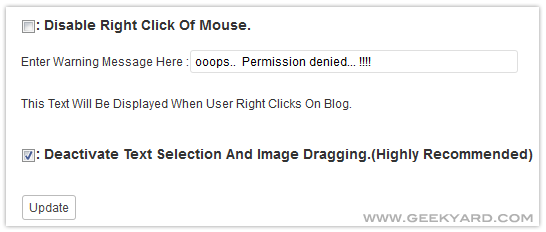
- Now Hit Update and See your blog page, Nothing can copied by dragging the page content,
It’s a free plugin, it Just Leave thier author backlink to your site footer for this valuable work, .
Problem persists comment below.


0 comments:
Post a Comment